Kubernetes Deployment : A Beginner's Guide
🚀 DevOps & Cloud Engineer | ☁️ AWS | 🐳 Docker | ☸️ Kubernetes | ⚙️ Jenkins | 🤖 Ansible | 🛠️ Terraform | 🔄 CI/CD | 🎯 ArgoCD | 📈 Driving Automation and Cloud Scalibility
A pod is a running specification for running a Container written in yaml manifest.
In docker , we usually write a command with arguments to run the container.
docker run -d -it -p 9000:9000 -tag rayeez/simple-app:latest --network=host --mountVol=V1
But in case of pods we will describe the same things in yaml manifest with more declarative , standardized approach.
apiVersion: v1

kind: Pod

metadata:

name: nginx

spec:

containers:

- name: nginx

image: nginx:1.14.2

ports:

- containerPort: 80
A Typical pod.yml File
Then using below command we can interact with kubernetes cluster:
kubectl apply -f pod.yml

Kubectl get pods

Kubectl get pods - o wide

Kubectl describe pods
If a person by mistake deleted a pod then,
kubectl delete pod nginx
This will delete the pod and it will don't have the capability to come up by itself.
Hence Kubernetes suggests user to use a wrapper Delpoyment.yml file over the pod.
Because of Deployment.yml file ,pods which goes down due to some reason, can automatically come up by itself or a new pod will be created in its place.
Deployment.yml file is responsible for Auto Healing and Auto Scaling feature in Kubernetes.
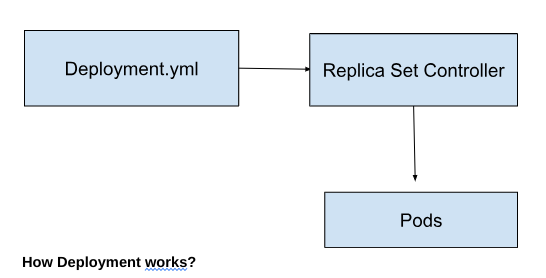
Deployment.yml file will actually create a replica set controller which is responsible for creating replicas of pods.
suppose if in deployment.yml file replica count is mentioned as 2, Even if a user deletes a pod by mistake , A new pod will be created simultaneously.
Termination of the existing pod and creation of a new pod will take place parallelly.
apiVersion: apps/v1
kind: Deployment
metadata:
  name: nginx-deployment
  labels:
    app: nginx
spec:
  replicas: 2
  selector:
    matchLabels:
      app: nginx
  template:
    metadata:
      labels:
        app: nginx
    spec:
      containers:
      - name: nginx
        image: nginx:1.14.2
        ports:
        - containerPort: 80
A Typical Deployment.yml File
Replica set controller will make sure that desired state in Deployment.yml file and actual state over the cluster are same.
Hence Even if a Pod gets down then replica set controller will actually create a new pod instantly and make sure that pods are up and running any time.This is known as Auto Healing in Kubernetes.
suppose if load on the application is getting increased because of increase in number of users on the website (ex: Festival Season),then devops engineers can increase the replica count in deployment.yml file with 85% threshold for each pod.
once a pod reached to its 85% capacity, then a new pod will be created automatically to balance the load.
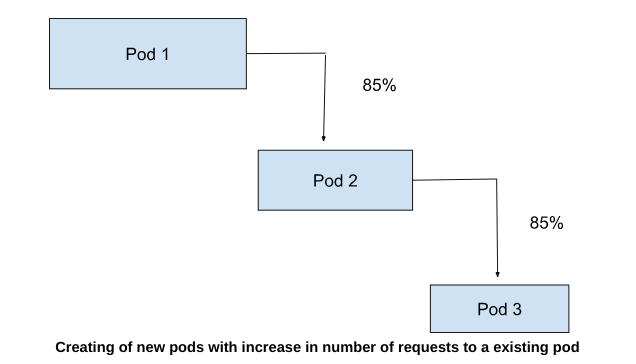
for example, If a pod can take atmost 1000 users requests but when requests gone beyond this number then a new pod will be created automatically.This makes an application scalable.This feature is known as Auto-scaling in kubernetes.


